 Solid-Reviews
Best Smart Locks for Renters: No Drilling Required (2026)
The short answer
Renters should buy a retrofit lock. One that installs on the inside of the door over your existing deadbolt's thumbturn, leaving the exterior lock and your landlord's key untouched. The August Wi-Fi Smart Lock (4th Gen) is the classic pick: compact, ~10-minute install, built-in Wi-Fi, auto-lock and auto-unlock, works with every major platform. The SwitchBot Lock Pro is the budget retrofit at ~$120 with wider compatibility (it even fits some mortise locks). The Wyze Lock Bolt v2 is the cheapest at ~$80 with built-in Wi-Fi and a fingerprint reader, but it's a full deadbolt replacement, so keep your original lock for move-out day. The Schlage Encode Plus is the best full replacement, but only if your landlord explicitly allows it, and you keep the original lock in a bag to reinstall when you move out.
Why renters need retrofit locks
Most leases say you can't replace the exterior lock cylinder, and even where the lease is silent, your landlord still needs a working key to your unit, and the exterior hardware usually belongs to the property. A retrofit smart lock solves this cleanly: it mounts on the interior side of the door, grips your deadbolt's existing thumbturn, and turns it with a motor. The outside of your door looks exactly the same. Your landlord's key still works. When you move out, you remove four screws, put the original thumbturn back, and there's nothing to patch, paint, or explain to anyone. No drilling, no lease violation, no lost deposit.
One ground rule before we start: none of these replace your landlord's key from working, and none of them should be installed on a door you don't have the right to modify. When in doubt, send your landlord a photo and get a yes in writing.
August Wi-Fi Smart Lock (4th Gen): Best overall for renters
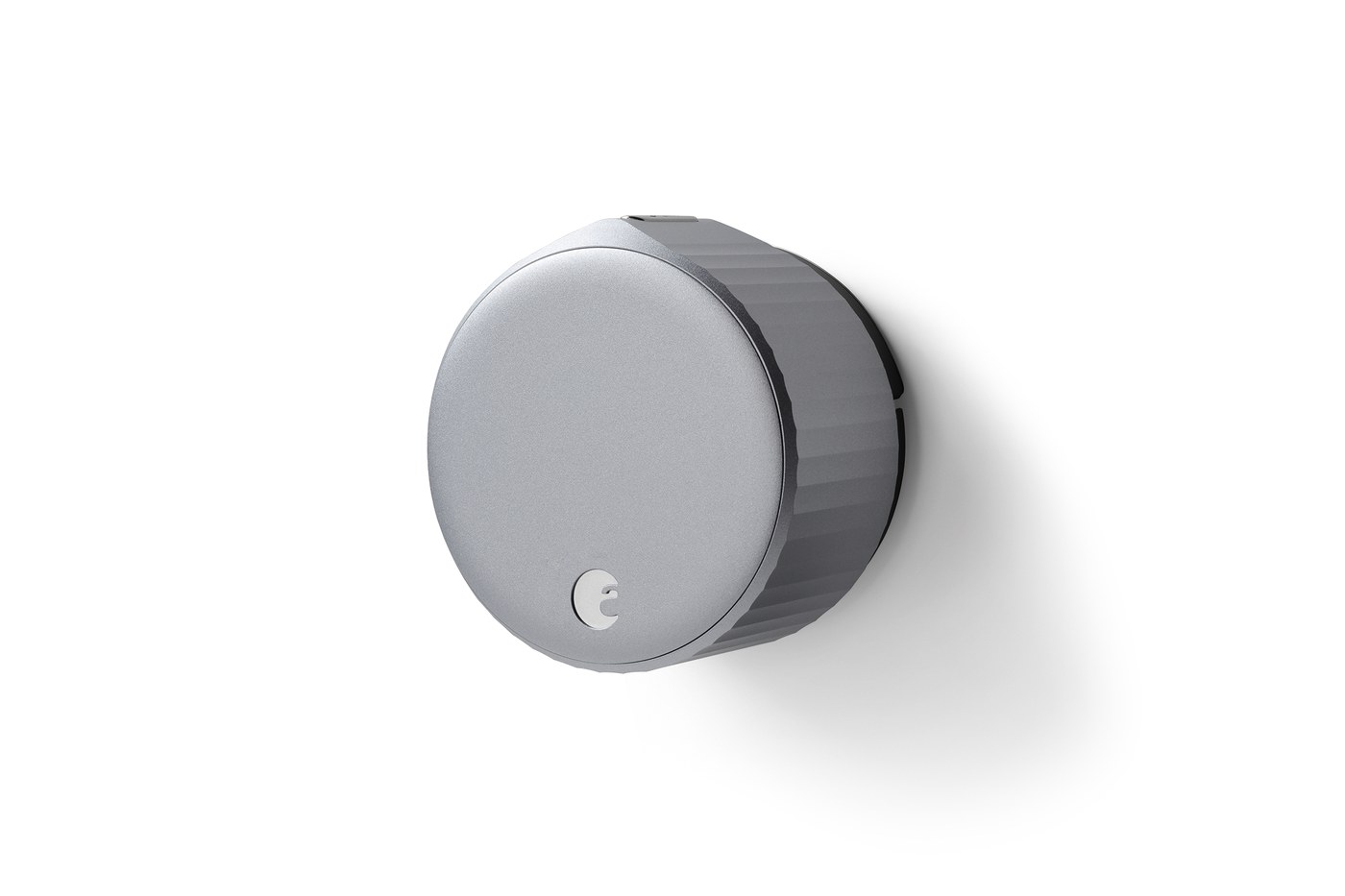
August invented the retrofit smart lock category, and the 4th-gen Wi-Fi model is the one to beat. It clamps onto your existing single-cylinder deadbolt's thumbturn in about 10 minutes with a screwdriver, and at roughly 2.8 inches across it's 45% smaller than the old August Smart Lock Pro. Small enough that it doesn't dominate the back of your door. Built-in Wi-Fi (no separate bridge to plug in), DoorSense to confirm the door is actually closed, geofenced auto-unlock as you approach, auto-lock when you leave, activity feed, virtual guest keys, and Alexa/Google/HomeKit/SmartThings support round out the package. Review consensus puts it at the top of the retrofit category: CNET scored it 8.3/10 and still calls it their favorite, and owners rate it 4.5 stars at major retailers.
Key specs
- Type: retrofit (mounts over existing deadbolt thumbturn; keeps your keys and exterior lock)
- Connectivity: built-in Wi-Fi (2.4GHz), Bluetooth; Alexa, Google Assistant, Apple HomeKit, SmartThings
- Power: 2× CR123 batteries
- Smart features: auto-lock, auto-unlock (geofencing), DoorSense open/closed sensor, guest access, activity feed
- Approx. price: ~$180–200 (often discounted from $230 list)
- Owner rating: 4.5 stars (major retailers); CNET 8.3/10
What owners consistently report: the installation really is a 10-minute job, the app walks you through setup well, auto-unlock works reliably once calibrated, and it's the only retrofit lock here with native HomeKit. Keeping your original key as a backup is the underrated feature. Nothing about this lock prevents the old-fashioned key from working.
The honest drawbacks. Battery life is the headline complaint: two CR123s and a power-hungry Wi-Fi radio means owners commonly report 2–3 months between battery changes on busy doors. Plan to keep spares. It's 2.4GHz Wi-Fi only, and reviewers note Wi-Fi setup and range can be finicky if your router is far from the door. There's no keypad on the lock itself (that's a separate August accessory), occasional app crashes get reported, and at ~$200 it's double the cost of the budget options below. Also, like all retrofit locks, it needs a standard single-cylinder deadbolt with a thumbturn. Knob or euro-cylinder doors need an adapter check first.
SwitchBot Lock Pro: Best budget retrofit
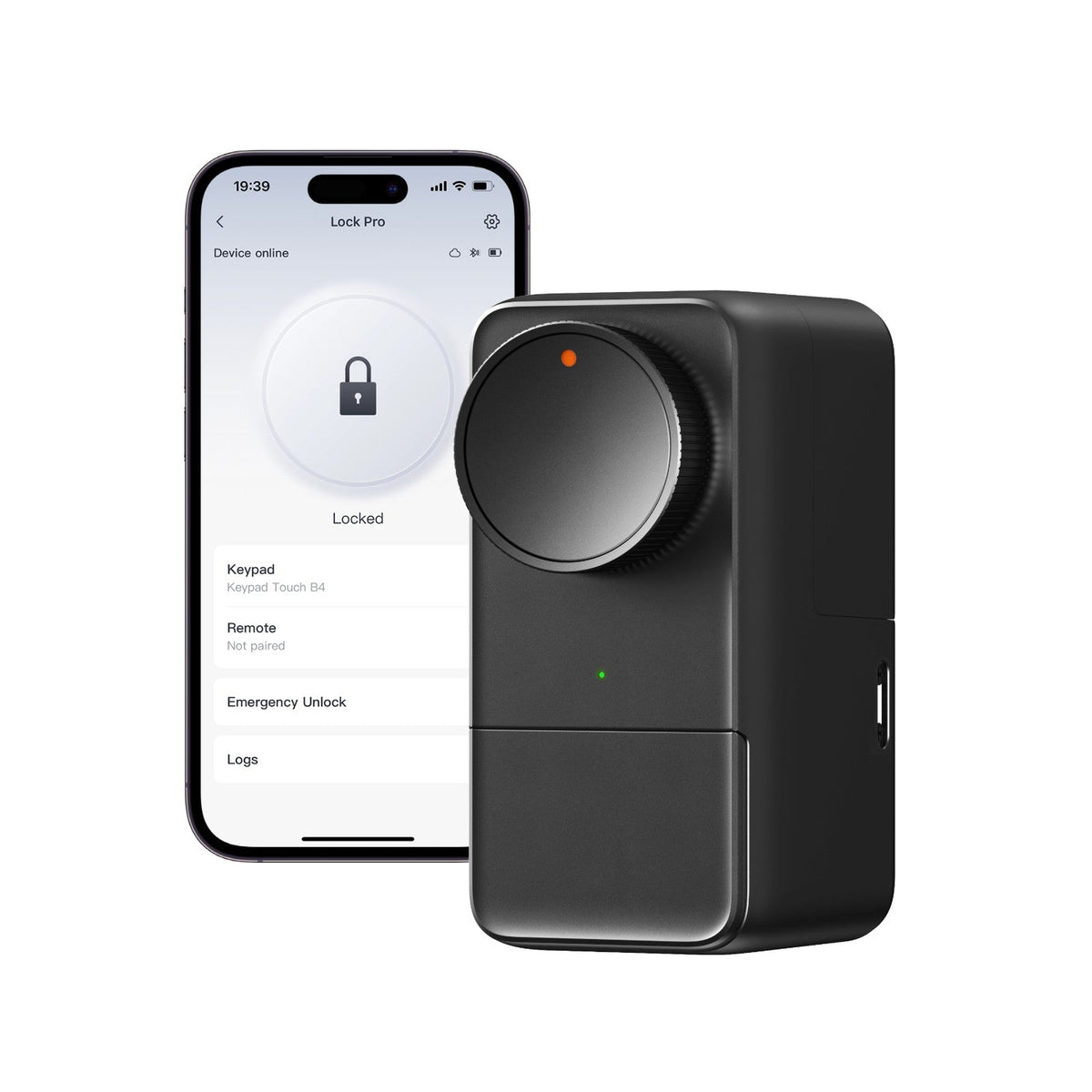
The Lock Pro is SwitchBot's answer to August, at roughly 60% of the price, and it solves one problem August doesn't: compatibility. Where August fits standard single-cylinder deadbolts, the Lock Pro's mounting system handles single-cylinder, jimmy-proof, and even some mortise locks (SwitchBot sells 3D-printed custom fittings for oddballs), and it's marketed explicitly as a no-drill install. It keeps your original key and lock fully functional, runs on 4×AA batteries, and includes auto-lock, a door-status magnet sensor, and real-time notifications.
Key specs
- Type: retrofit (no-drill, fits over existing thumbturn; wider compatibility than August)
- Connectivity: Bluetooth native; Wi-Fi/Matter/voice via optional Hub (sold separately); Alexa, Google, Apple Home via hub
- Power: 4× AA batteries (6–9 months claimed; up to 9–12 with optional Dual Power Pack)
- Smart features: auto-lock, door status alerts, activity logs; Keypad Touch add-on ($60) adds fingerprint, NFC, and passcodes. Up to 15 unlock methods
- Approx. price: ~$120 (lock only)
- Owner rating: ~4/5 owner ratings; MakeUseOf rated 9/10
What owners consistently report: wide lock compatibility is the standout. Apartment doors with non-standard hardware are where this wins. The aluminum casing feels more substantial than the price suggests, and the install really is tool-free in most cases.
The honest drawbacks. It's bulky. TechHive's review calls the appearance "too brutalist for many homes," and at 120×59×84mm it's visibly larger than the August. The $120 price is misleading: there's no built-in Wi-Fi, so remote access, notifications, and voice control require the Hub Mini (sold separately), and fingerprint/passcode entry requires the Keypad Touch ($60). The full setup lands around $180+, at which point the August comparison gets uncomfortable. Reviewers also note the tiny mounting screws make physical installation fiddly despite the "tool-free" marketing, and the app occasionally hangs. Out of the box, it talks Bluetooth to your phone. Fine if you're standing at the door, limiting if you want to let a guest in from across town.
Wyze Lock Bolt v2: Cheapest option (with a catch)
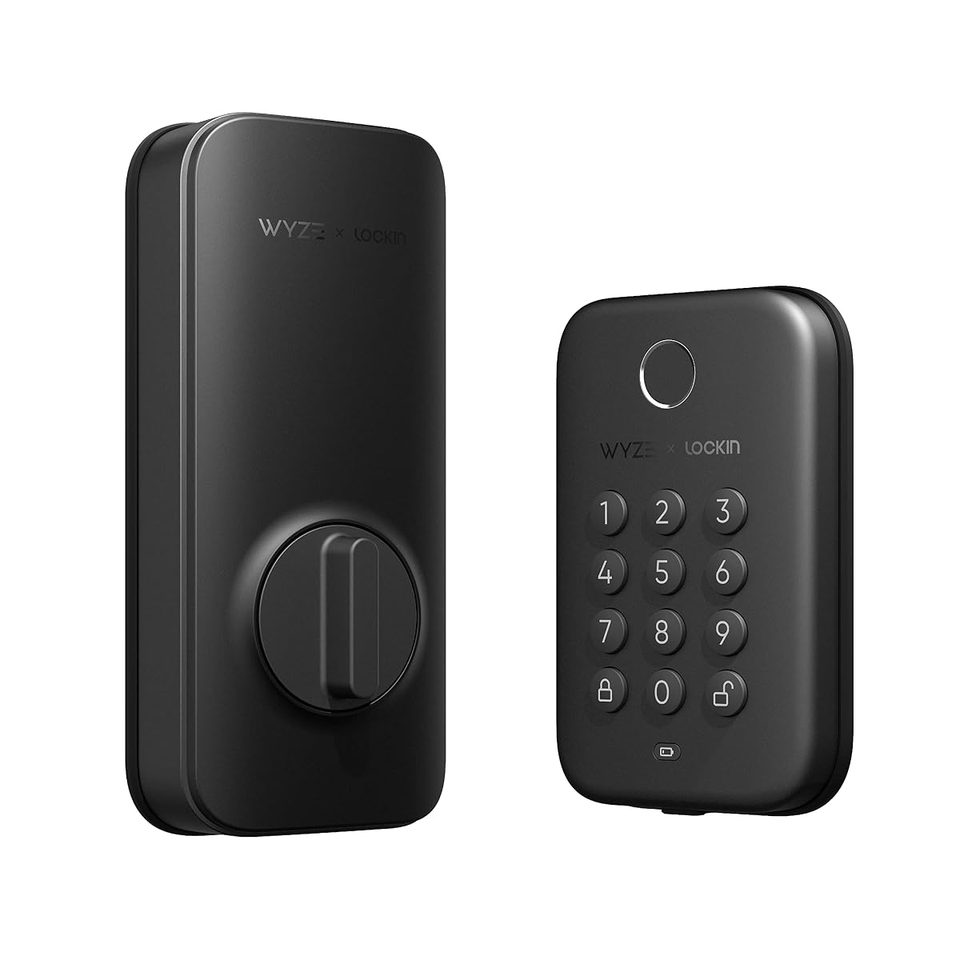
Wyze discontinued the original retrofit Wyze Lock, so the budget pick is now the Lock Bolt v2: ~$80 buys a full deadbolt replacement with built-in Wi-Fi, a self-learning fingerprint reader (unlocks in about half a second, per Wyze), an illuminated touch keypad with up to 50 codes, and, restored in this version, a real mechanical key. Remote lock/unlock works over Wi-Fi with no plug-in gateway, and it talks to Alexa and Google Assistant.
Key specs
- Type: full deadbolt replacement (you remove your existing deadbolt to install it, keep the original in a bag to reinstall at move-out)
- Connectivity: built-in Wi-Fi; Alexa, Google Assistant (no HomeKit)
- Power: 8× AA batteries (up to 8 months claimed); USB-C emergency power port
- Smart features: fingerprint unlock, up to 50 keypad codes plus one-time guest codes, auto-lock timer, tamper/jam alarms, control from Wyze doorbell livestreams
- Approx. price: ~$80
- Owner rating: new model (late 2025). Long-term reliability data still thin; PCWorld praised the value
What owners consistently report: it's early days for this revision, but the v1 Bolt was already the budget fingerprint pick, and the v2 fixes its two biggest complaints, no Wi-Fi and no keyway.
The honest drawbacks. This is not a retrofit lock. It replaces your deadbolt, so it's strictly a "keep the original for move-out" pick, and some leases forbid lock swaps outright. No door-ajar sensor, no HomeKit, and Wyze's security track record matters for a security device: in February 2024 an outage exposed ~13,000 users to other customers' camera thumbnails, following a similar 2023 incident. The lock itself stores little cloud data, but you're buying into that company's posture. Claimed battery life (8 months) is mid-pack.
Schlage Encode Plus: Best full replacement (landlord permission required)
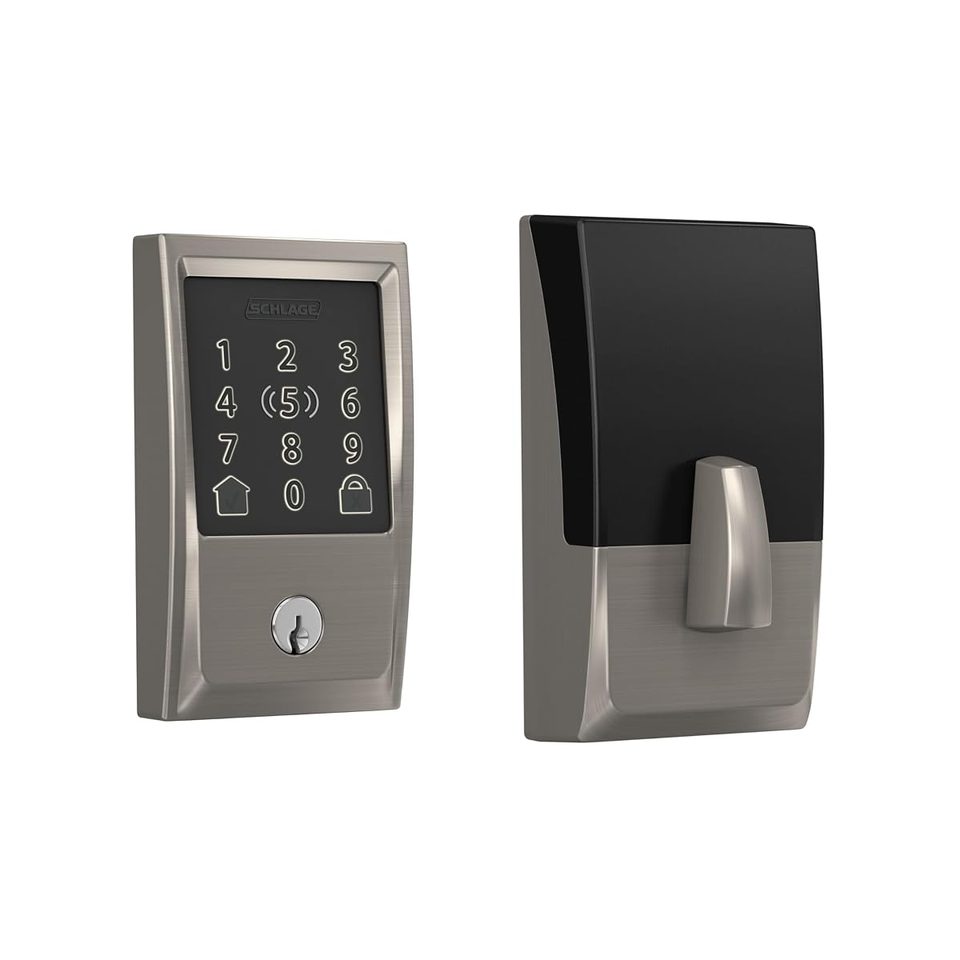
If your landlord gives you the green light, the Encode Plus is the best smart lock here, period. It's a full ANSI/BHMA Grade 1 deadbolt, the highest residential security rating, with a fingerprint-resistant touchscreen keypad, built-in Wi-Fi, Thread, NFC, and Bluetooth, plus Apple Home Key (tap your iPhone or Apple Watch to unlock, even with a dead phone battery). Up to 100 access codes, real-time alerts, remote lock/unlock, and Alexa/Google/HomeKit support. Owners rate it 4.1/5 across ~2,100+ reviews, with particularly high marks at Home Depot.
Key specs
- Type: full deadbolt replacement (replaces the entire existing deadbolt, interior + exterior)
- Connectivity: built-in Wi-Fi (2.4GHz), Thread, NFC, Bluetooth; Alexa, Google, Apple HomeKit + Apple Home Key
- Power: 4× AA batteries (6–12 months per manufacturer; heavy Wi-Fi use shortens this)
- Smart features: touchscreen keypad with 100 codes, Apple Home Key, auto-lock timer, activity history, built-in alarm
- Approx. price: ~$260–300 typical (list $299.99)
- Owner rating: 4.1/5 (~2,100+ reviews)
What owners consistently report: the Apple Home Key tap-to-unlock feels like magic, installation takes ~15 minutes with the Snap 'n Stay design, and the build quality is a step above every retrofit lock here. It's the only pick with a Grade 1 security certification.
The honest drawbacks. It's a full replacement: the exterior keypad goes on the outside of your door and your landlord's existing key won't work anymore, which is why you need written permission and must keep the original lock to reinstall at move-out. It's the most expensive pick by a wide margin. The touchscreen can be sluggish in extreme cold. And while the rating is good, it's the lowest of the four here. A chunk of owners report Wi-Fi setup friction and faster-than-expected battery drain when the lock sits far from the router. Renters in cold-climate buildings should also know smart-lock touchscreens generally get worse as temperatures drop.
What happens when the Wi-Fi dies
Every lock here keeps working without Wi-Fi. This is the question renters ask most, and the answer is reassuring across the board:
- August, Wyze, SwitchBot: all still operate over Bluetooth from your phone nearby, and critically, your original physical key still works in every retrofit install. A dead battery is the bigger risk: August and SwitchBot warn you in-app at low battery; keep spares, because a retrofit lock with a dead battery just means you use your key. You can't get locked out unless the deadbolt itself is thrown and you have no key.
- Schlage Encode Plus: the touchscreen keypad works without Wi-Fi (codes are stored locally on the lock), so guests aren't stranded; your physical key works as backup. If the batteries die completely, you're using the key, same as a dumb lock.
The practical takeaway: keep your original key on your person, always, regardless of which lock you buy. Smart locks add convenience; the key is your redundancy.
Frequently asked questions
Can renters install a smart lock?
Yes. If you choose a retrofit lock. Retrofit locks (August, SwitchBot) mount on the inside of the door over your existing deadbolt's thumbturn: no drilling, no exterior changes, and your landlord's key keeps working. They install with a screwdriver in 10–15 minutes and remove just as cleanly. What renters should not do is replace the entire deadbolt without written landlord permission. That's the Schlage Encode Plus path, and it's a different conversation.
Do I need my landlord's permission for a smart lock?
For a retrofit lock that doesn't alter the exterior hardware or the key: most leases don't require permission, but getting a yes in writing costs you one text message and eliminates all risk. For a full deadbolt replacement: yes, always, in writing. You're changing the lock your landlord has a key to. When in doubt, send a photo of the product and the install method; "it clamps over the inside thumbturn and the outside doesn't change" gets approved far more often than you'd expect.
Will I get my security deposit back: Can I put the original lock back?
This is the real anxiety behind every renter smart-lock search, and the answer is reassuring: a retrofit install is fully reversible. You remove four screws, reattach the original thumbturn, and there's nothing to patch, paint, or explain. Pro tip from owner forums: put the original thumbturn and screws in a labeled bag the day you install the smart lock, so move-out day is a five-minute job instead of a hardware-store hunt.
Which smart lock needs no drilling at all?
The August Wi-Fi (4th Gen) and SwitchBot Lock Pro are both marketed and reviewed as no-drill installs: they clamp onto the existing thumbturn. In practice, "no drilling" means no new holes in your door; you're still removing and replacing the screws that hold the interior thumbturn plate, which uses the existing holes. That's the distinction landlords care about, and it's why retrofit locks pass the deposit test.
What happens to a smart lock when the Wi-Fi dies?
Nothing bad. August, SwitchBot, and Schlage all keep working over Bluetooth from your phone nearby. The Wyze Lock Bolt v2 keeps working via fingerprint, keypad codes, and its physical key (its app control is Wi-Fi, so Bluetooth phone control can't be assumed). Your original physical key still works in every retrofit install. Keypad models (Schlage, SwitchBot with keypad add-on) work fully offline since codes are stored on the lock. The bigger risk is dead batteries. Keep spares, and always keep your original key on you as backup.
Our recommendations
| Top pick | Budget pick | Who should skip | |
|---|---|---|---|
| Pick | August Wi-Fi Smart Lock (4th Gen) | SwitchBot Lock Pro | Schlage Encode Plus, unless your landlord approves |
| Why | The classic retrofit: smallest, built-in Wi-Fi, every platform, 10-minute install | Cheapest true retrofit, widest lock compatibility | Best lock here, but it's a full deadbolt replacement, wrong tool for a lease |
| Verdict | The default answer for renters. | For oddball apartment doors or tight budgets (factor in hub/keypad costs). | Get written landlord permission first, and bag the original lock for move-out day. |
The verdict, plainly: retrofit wins for renters because it can't violate a lease. The August is the most polished version of that idea; the SwitchBot is the value version with broader compatibility; the Wyze is the cheapest path to fingerprint + Wi-Fi if your lease allows a deadbolt swap. The Schlage is the best lock here but the worst renter choice unless your landlord says yes, at which point it's also the most secure and the only one with Apple Home Key. Whichever you choose, keep your original key, keep the old hardware, and get permission in writing.
| Product | Best for | Approx. price | Owner rating |
|---|---|---|---|
| August Wi-Fi Smart Lock (4th Gen) | Best overall for renters (retrofit) | ~$180–200 | 4.5 stars; CNET 8.3/10 |
| SwitchBot Lock Pro | Budget retrofit, widest compatibility | ~$120 (lock only) | ~4/5; MakeUseOf 9/10 |
| Wyze Lock Bolt v2 | Cheapest with fingerprint + Wi-Fi | ~$80 | New model (late 2025) |
| Schlage Encode Plus | Full replacement (needs landlord OK) | ~$260–300 | 4.1/5 (~2,100+ reviews) |
Prices and ratings shift. Check current pricing before you buy.